How Does Fiber Optic Installation Work for a Commercial Building?
Step-by-step guide to fiber optic installation in commercial buildings. Planning, installation, testing, and maintenance.

Understanding fiber optic installation in commercial buildings helps businesses plan effectively and set realistic expectations. The process involves several phases, each requiring specialized expertise and equipment. From initial planning through testing and maintenance, every step contributes to a successful fiber network.
Commercial buildings present unique challenges for fiber installation. Multi-story structures, existing infrastructure, and business operations all influence the installation approach. Professional installers navigate these challenges to deliver reliable, high-performance fiber networks.

Pre-Installation Planning
Site Assessment
Every fiber installation begins with a thorough site assessment. A qualified technician evaluates the building to understand its unique characteristics and requirements.
The site assessment includes:
- Building layout: Understanding floor plans, elevator shafts, and utility corridors
- Existing infrastructure: Identifying current cabling, conduit, and network equipment
- Cable routing: Determining optimal paths for fiber cables
- Power requirements: Assessing power availability for active equipment
- Access points: Identifying entry points for external fiber connections
This assessment provides the foundation for a detailed installation plan.
Network Design
Based on the site assessment, engineers design the fiber network. This design specifies:
- Cable types: Single-mode or multi-mode fiber based on distance and bandwidth requirements
- Cable routes: Specific paths for fiber cables through the building
- Termination points: Locations for patch panels, distribution boxes, and connection points
- Equipment placement: Locations for switches, routers, and other active equipment
- Capacity planning: Ensuring the network can support current and future bandwidth needs
The design phase also includes creating detailed drawings and documentation that guide the installation process.
Permitting and Coordination
Commercial fiber installations often require permits and coordination with building management. This includes:
- Building permits for construction work
- Coordination with property management for access
- Scheduling to minimize disruption to building occupants
- Notification of affected tenants or businesses
Professional installers handle these logistics as part of their service.
The Installation Process
Phase 1: Cable Routing
The first physical step is routing fiber cables through the building. Technicians use various methods depending on the building structure:
Conduit Installation
In many commercial buildings, new conduit is installed to house fiber cables. Conduit provides protection and makes future upgrades easier. Technicians install conduit in:
- Vertical risers between floors
- Horizontal runs through ceilings or under floors
- Outdoor pathways between buildings
Cable Tray Installation
Cable trays provide an organized pathway for fiber cables. They are commonly used in:
- Data centers and server rooms
- Open ceiling environments
- Buildings with existing cable management infrastructure
Retrofit Installation
Older buildings may require retrofit installation techniques. This can include:
- Running cables through existing conduit
- Using cable ladders or hangers
- Creating new pathways where none exist
Phase 2: Cable Installation
After pathways are established, technicians pull fiber cables through the building. This process requires careful handling to avoid damaging the fragile fiber strands.
Key considerations during cable installation:
- Bending radius: Fiber cables must not be bent beyond their specified radius
- Tension limits: Cables must not be pulled with excessive force
- Cable management: Cables must be properly supported and organized
- Labeling: Both ends of each cable must be clearly labeled
Phase 3: Splicing and Termination
Once cables are in place, the next step is joining cables and terminating connections.
Fusion Splicing
Fusion splicing creates permanent, low-loss connections between fiber cables. This process:
- Strips the protective coating from fiber ends
- Cleaves the fiber ends to create clean, flat surfaces
- Aligns the fiber ends in the splicing equipment
- Fuses the fibers using an electric arc
- Protects the splice with a protective sleeve
Fusion splicing produces connections with minimal signal loss, typically less than 0.02 dB per splice.
Connector Termination
Connectors are installed at termination points to link fiber cables to equipment. The termination process:
- Prepares the fiber end
- Epoxy or mechanical splices the connector
- Polishes the connector end-face
- Tests the connector for performance
Common connector types include SC, LC, and ST. The choice depends on the equipment being connected.
Phase 4: Equipment Installation
After cables are spliced and terminated, technicians install active equipment:
- Switches and routers: Network equipment that distributes fiber connectivity
- Patch panels: Organize and manage fiber connections
- Optical transceivers: Convert electrical signals to optical and back
- Media converters: Connect fiber to existing copper equipment
Equipment is typically installed in server rooms or telecommunications closets.
Testing and Certification
OTDR Testing
Optical Time Domain Reflectometer (OTDR) testing verifies the integrity of every fiber link. This test:
- Measures total signal loss across the fiber
- Identifies the location of any faults or high-loss points
- Verifies splice and connector quality
- Documents the fiber route and characteristics
Insertion Loss Testing
Insertion loss testing measures the total signal loss from one end of a fiber link to the other. This test verifies that the network meets performance specifications.
Documentation
Comprehensive documentation includes:
- Test results for every fiber link
- Cable route maps
- Equipment inventory
- Connector and splice loss records
- Maintenance guidelines
This documentation is essential for ongoing network management.
Building Types and Installation Considerations
Office Buildings
Office buildings typically require fiber networks that support:
- Employee workstations
- VoIP phone systems
- Video conferencing
- Cloud application access
- Wireless access points
Installation in office buildings often involves routing cables through ceiling spaces and under raised floors.
Industrial Facilities
Industrial facilities present unique challenges:
- Harsh environmental conditions
- Electromagnetic interference from machinery
- Long cable runs between buildings
- Requirements for ruggedized equipment
Fiber optics are ideal for industrial environments because they are immune to electromagnetic interference.
Data Centers
Data centers require high-density fiber installations:
- Thousands of fiber connections
- Precision cable management
- High-speed interconnects between equipment
- Redundant paths for reliability
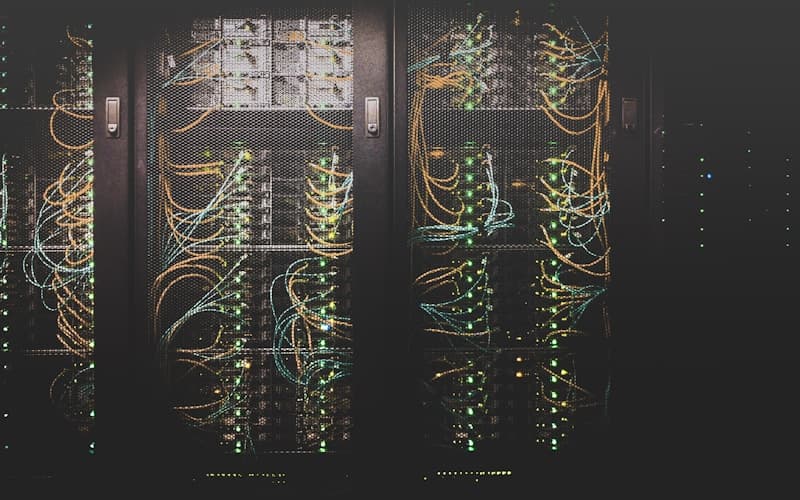
Data center installations use specialized high-density connectors and cable management systems.
Mixed-Use Buildings
Buildings with multiple tenants require coordination:
- Shared infrastructure planning
- Individual tenant connections
- Access control and security
- Future expansion capabilities
Maintenance and Support
Preventive Maintenance
Regular maintenance keeps fiber networks performing optimally:
- Cleaning: Regular cleaning of connectors and termination points
- Inspection: Visual inspection of cables and connections
- Testing: Periodic performance testing to identify degradation
- Documentation: Updating records as changes are made
Troubleshooting
When issues arise, professional troubleshooting includes:
- Identifying the location of faults using OTDR testing
- Repairing or replacing damaged cables or connections
- Verifying restoration of network performance
- Updating documentation to reflect changes
Ongoing Support
Most professional fiber installation providers offer ongoing support services:
- 24/7 monitoring and troubleshooting
- Emergency repair services
- Capacity upgrades and expansions
- Technology refresh planning
Choosing a Professional Installer
Essential Qualities
Selecting the right installer is critical for a successful commercial fiber installation:
- Commercial experience: Proven track record with commercial building installations
- Certifications: Proper training and industry certifications
- Quality materials: Use of high-quality cables and components
- Comprehensive service: End-to-end installation from planning to testing
- Warranty coverage: Protection on materials and workmanship
Questions to Ask
Before selecting an installer, ask:
- How many commercial fiber installations have you completed?
- What building types have you worked with?
- What certifications does your team hold?
- What warranty do you offer?
- Do you provide ongoing maintenance and support?
Getting Started
The first step toward fiber connectivity in your commercial building is a professional site assessment. A qualified installer will evaluate your building, understand your requirements, and provide a detailed installation plan and proposal.
Invest in fiber today and ensure your building has the connectivity infrastructure needed for tomorrow's demands.
Frequently Asked Questions
What are the advantages of fiber optic cables over copper?▼
How long do fiber optic cables last?▼
Is fiber optic installation disruptive to business operations?▼
What is the difference between single-mode and multi-mode fiber?▼
How much does fiber optic installation cost?▼
Continue reading
More articles in Fiber Optics →