Cost of Messy Server Racks: Operational Vulnerabilities
Learn how disorganized server racks and tangled cabling increase Mean Time to Repair and cost Kampala businesses thousands in downtime every month.
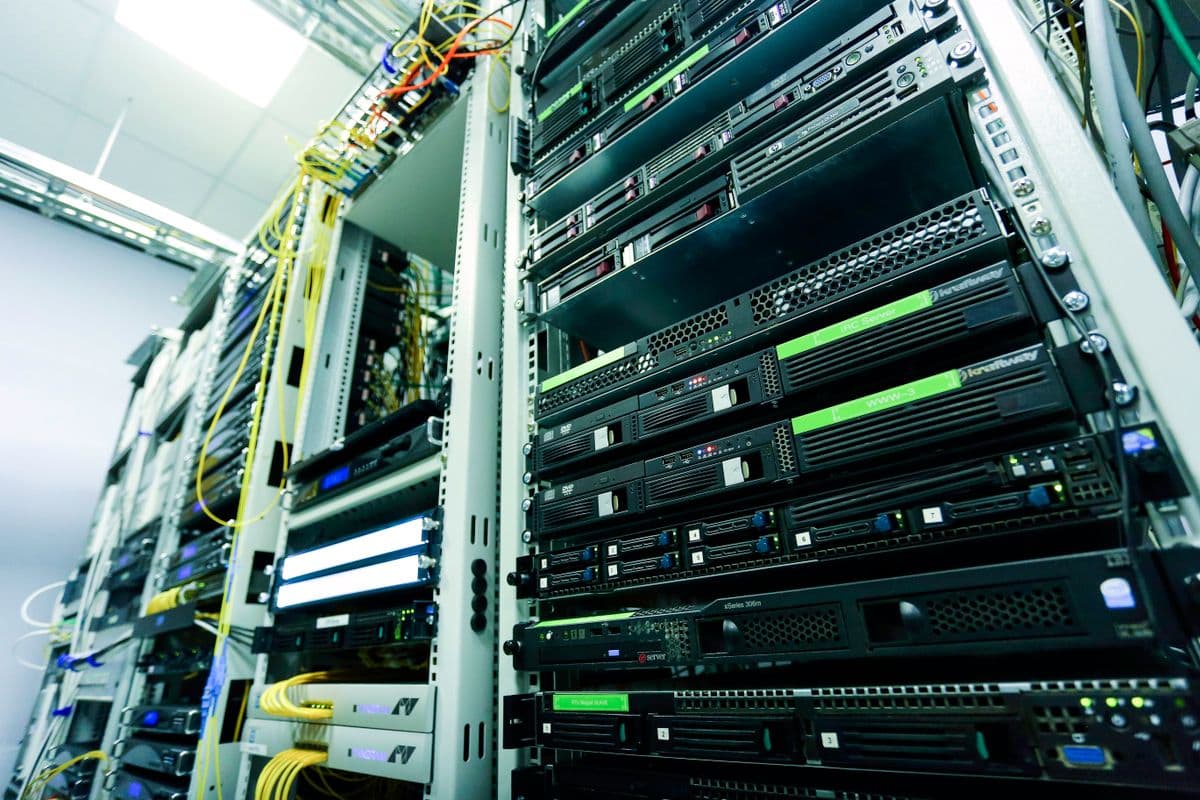
Design considerations
- Disorganized racks cause 6x longer troubleshooting times—90 minutes vs. 15 minutes for the same fault diagnosis in a properly labeled environment.
- TIA/EIA-606-B compliant labeling and structured cable management pay for themselves within one prevented outage for most Kampala businesses.
When network performance slows down or an office floor loses connection entirely, time is currency. For many corporate offices in Kampala, simple network diagnostics take hours instead of minutes due to unmanaged server room hardware. A tangled mass of patch cables, loose hanging lines, and unlabeled ports slows down technical troubleshooting.
Without optimized structured cabling components, tracking down a faulty patch connection requires manual cable testing across entire distribution paths. For best practices on organizing your server room, see our guide to server rack setup in Uganda. This infrastructure disorganization directly causes:
- Increased Mean Time to Repair (MTTR) during network drops
- Restricted airflow creating intense heat buildup near sensitive server cards
- Accidental disconnects of neighbor lines during regular maintenance tasks
Investing in clean vertical cable management setups, neat bundle lacing, and color-coded structural mapping eliminates these operational bottlenecks instantly. If you're new to structured cabling fundamentals, start with our guide to what is structured cabling.
The Hidden Financial Impact of Cable Chaos
A single network outage in a mid-sized Ugandan enterprise can cause significant lost productivity, depending on the industry. When your IT team spends three hours tracing a single cable that should have taken five minutes, those costs compound rapidly.
Real-World Scenario: Nakasero Financial Services Firm
Consider a typical scenario at a financial services firm in Nakasero: a core switch port fails at 10:00 AM.
| Scenario | Identification | Tracing | Replacement | Total Downtime |
|---|---|---|---|---|
| Properly labeled rack | 3 min | 2 min | 10 min | 15 min |
| Chaotic rack | 45 min | 30 min | 15 min | 90 min |
That's a 6x difference in downtime duration—with proportional revenue impact.
A single switch failure in a tangled rack can generate 5–10 secondary faults as disturbed cables lose connection. The MTTR in disorganized racks averages 3.5 hours compared to 12 minutes in properly structured environments. This represents a 17x increase in downtime duration that directly impacts business revenue.
Physical Disconnection Risks
Tracing an unmarked line by hand often leads to accidental partial disconnections of nearby functional lines. A technician pulling on one cable to trace it may disturb adjacent cables, creating additional faults that compound the original problem. This cascading failure mode is a direct consequence of cable disorganization.
Thermal Stress: The Silent Equipment Killer
Disorganized cable masses trailing behind active switch intake fans choke essential air currents, creating isolated heat pockets that degrade critical core processor chips. Network switches and servers are designed to operate within specific thermal envelopes—typically 10°C to 35°C. When cable clutter blocks airflow, localized temperatures can exceed 45°C, reducing equipment lifespan by up to 50%.
According to ASHRAE Thermal Guidelines, every 10°C increase above the recommended maximum reduces electronic component reliability by 50%. In Kampala's ambient climate, where external temperatures regularly hit 28-32°C, proper airflow management isn't optional—it's essential for asset protection.
Thermal Impact in Uganda's Climate
| Condition | Equipment Lifespan | Failure Rate |
|---|---|---|
| Proper airflow (20-24°C) | 7-10 years | Low |
| Restricted airflow (35-40°C) | 4-6 years | Moderate |
| Blocked airflow (45°C+) | 2-3 years | High |
Quantifying the Financial Impact
Productivity Loss
For a Kampala business with 50 employees, one hour of network downtime costs significantly in lost productivity alone. The immediate productivity loss is only the visible portion of the damage. Behind the scenes, customer transactions fail, orders cannot be processed, emails bounce, and the business's reputation suffers damage that may take months to repair.
Secondary Costs
Replacement equipment costs increase when technicians damage adjacent cables during emergency troubleshooting. Overtime labor costs escalate when problems persist beyond normal working hours. Customer compensation costs arise when service level agreements are violated due to preventable outages. These secondary costs often exceed the primary productivity loss.
The TIA/EIA-606-B Labeling Standard
The Telecommunications Industry Association's TIA/EIA-606-B standard provides a comprehensive framework for cable identification and administration:
- Unique identifiers for every cable, connector, and pathway
- Color-coding schemes for different service types (data, voice, security, building management)
- Documentation maintained in a searchable database, not just on paper
- Physical labels at both ends of every cable, resistant to heat and fading
Implementing this standard transforms a chaotic rack into a navigable infrastructure map. When a new engineer joins your team, they can locate any connection in seconds rather than minutes.
Vertical vs. Horizontal Cable Management
Horizontal cable managers (typically 1U or 2U) sit between patch panels and switches, organizing patch cords in neat rows. They prevent the "waterfall effect" where cables cascade down the front of the rack, blocking access to equipment.
Vertical cable managers (also called vertical cable organizers or VCOs) run along the sides of the rack, providing high-capacity pathways for trunk cables and fiber. They feature fingers or slots that separate and route cables cleanly, maintaining bend radius compliance.
Best practice: Use both. Horizontal managers for patch cords, vertical managers for backbone cables. This separation prevents cross-contamination and makes future moves, adds, and changes (MACs) straightforward.
Real-World Case: Kampala Hotel Network Overhaul
A 120-room hotel in Kololo experienced daily guest WiFi complaints. Their server room was a disaster: 200+ cables with no labels, zip-tied in bundles so tight they deformed the jackets. Average troubleshooting time: 3 hours per incident.
After implementing structured cabling with TIA-606-B labeling, horizontal and vertical cable management, and color-coded patch cords:
| Metric | Before | After | Improvement |
|---|---|---|---|
| Troubleshooting time | 3 hours | 12 min | 93% reduction |
| Guest WiFi complaints | Daily | Rare | 87% decrease |
| IT manager sleep quality | Poor | Excellent | Transformed |
The project paid for itself within 4 months through reduced downtime and overtime costs.
Prevention Strategies and Implementation
Step 1: Infrastructure Audit
Conduct a comprehensive audit documenting cable count, routing, labeling status, and management hardware condition. Professional auditors use standardized checklists aligned with TIA-568 and TIA-606-B standards.
Step 2: Hardware Deployment
| Component | Function |
|---|---|
| Horizontal managers (1U/2U) | Patch cord routing |
| Vertical managers | Backbone cable routing |
| TIA-606-B labels | Cable identification |
| Velcro straps | Cable securing |
Step 3: Labeling Implementation
Every cable should be labeled at both ends within 150mm of the termination point. In Kampala's humid environment, use laminated or heat-shrink labels for long-term durability.
Step 4: Change Management
Establish a cable change management policy requiring all modifications to follow established routing paths, use appropriate management hardware, include proper labeling, and be documented in the cable management database. Exceptions for emergency changes should be limited and require subsequent remediation.
Building a Culture of Infrastructure Discipline
Technical solutions alone cannot solve the problem. Regular training sessions and documented procedures ensure all staff understand the importance of maintaining structured cabling standards.
- Monthly visual inspections catch unplanned additions or hardware failures
- Quarterly comprehensive audits verify labeling accuracy and documentation currency
- Annual certification testing validates infrastructure performance
Conclusion: From Liability to Asset
Your server room is either a liability that bleeds money during every outage, or an asset that enables rapid problem resolution and protects your hardware investment. The difference isn't expensive equipment—it's disciplined organization.
Backspace Business Solutions designs and deploys structured cabling systems that meet TIA/EIA standards, include comprehensive labeling and documentation, and incorporate thermal management best practices.
Ready to eliminate cable chaos? Contact our team for a free on-site assessment of your server room infrastructure.
Request Free Site Survey to get started today.
Frequently Asked Questions
What is structured cabling and why is it important for businesses?▼
How long does a structured cabling installation take?▼
What cable categories should I use for my office network?▼
How often should structured cabling be inspected?▼
Can structured cabling support both data and voice applications?▼
Continue reading
More articles in Structured Cabling →